

Audioform Format
What can audioform do?
Typically one can create a piece of audio like this with audioform:
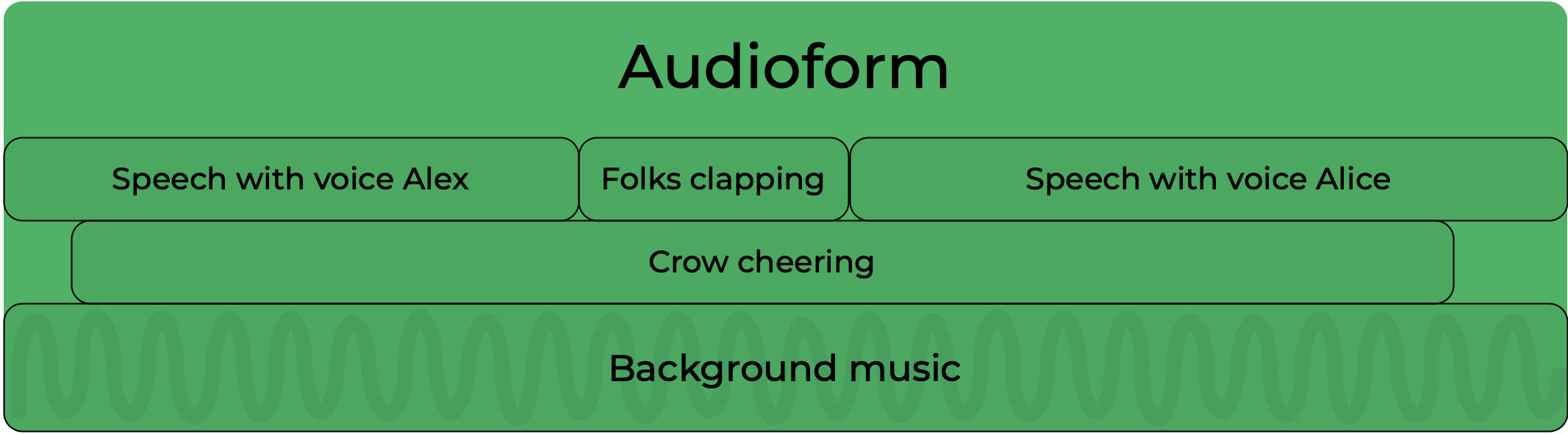
Import and create assets
Audioform arrange together and mix different kind of elements (called assets). Those are:
- Text-to-speech (a combination of text and a voice from the Voice library)
- Speech-to-speech (a combination of a text recording and a voice from the Voice library)
- Sound effects (a sound from the Sound effect library)
- Sound template, or sound bed (a sound from the Sound template library)
- An audio file from the File library
Arrange
The assets are arranged via an arrangement that lay them out over time and determines the relative position and overlap of the assets.
The arrangement is first divided in consecutive Sections (minimum one):

Each section contains one or more layers playing together. It has an optional sound template (or sound bed) that will play in the background of the section, and will play for the duration of the section:
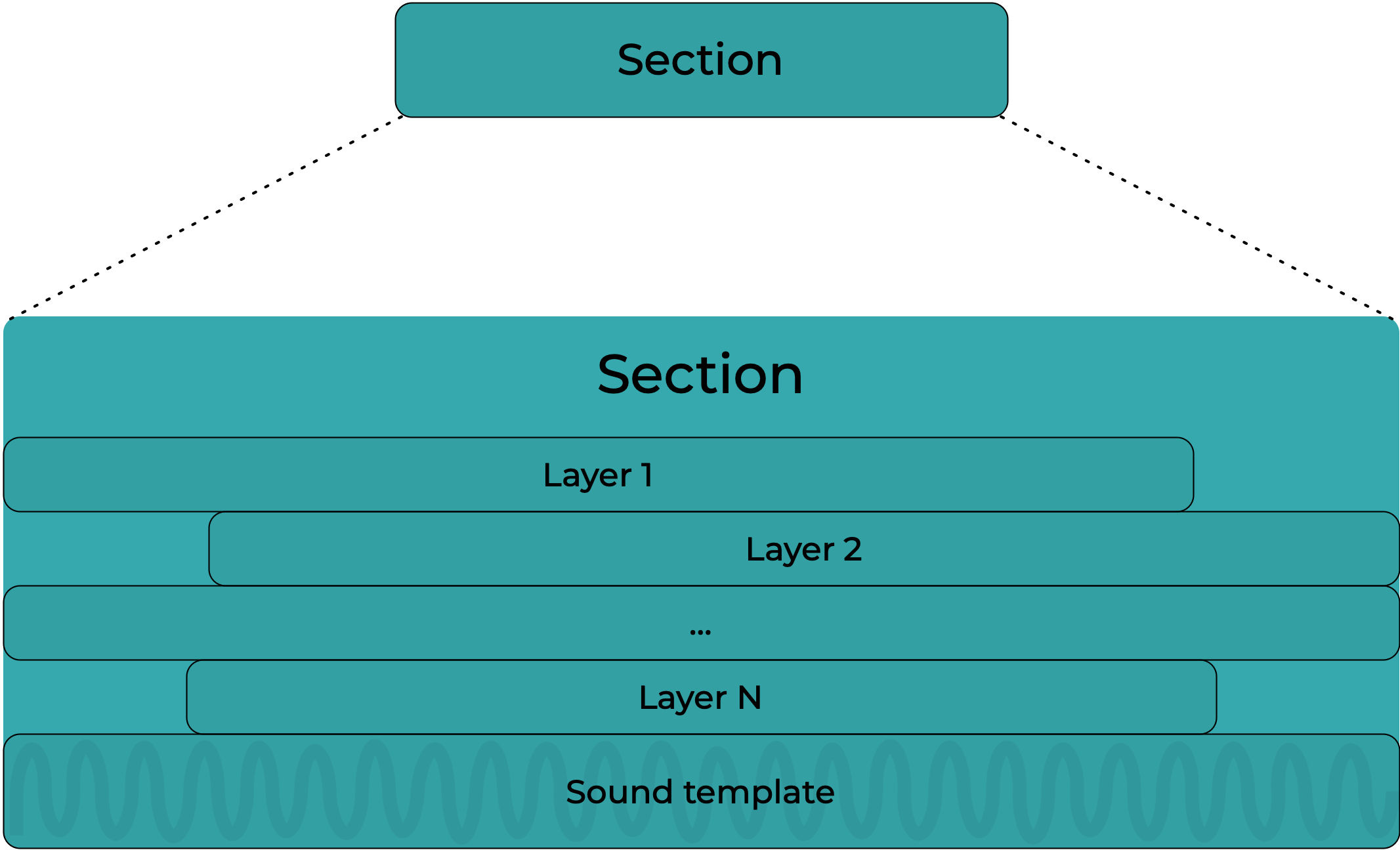
The Smart Fit feature will fit the sound template perfectly to the section, doing a smart edit of the sound template combining the start and the end of the music in one piece.
Each layer contains contiguous clips. The clips contains one asset.

Timing and duration
The audioform arrangement is designed to be flexible: it can adapt to its content (the assets) but can also have timing constraints such as:
- forcing the duration of a section or a clip
- add a pause (no sound) between two consecutive sections or clips
- align layers with each others
Produce
The arrangement is mixed by our cloud mixing engine.
The engine has knowledge of the asset types and is therefore able to process them differently, irrespective of the layer they are in, so that the result always sounds great.
If you have knowledge of Audio production software (DAWs), do not equate the concept of tracks in a DAW to that of Layers in Audioform as different assets in the same layer could end up in different tracks in our mixing engine. The Arrangement is about timing essentially.
The mixing presets supported by audioform are the following:
-
neutral: balanced between music and voiceGeneral-purpose, equal priority between voice and music. Voice remains intelligible without fully suppressing music. Suitable when music is present but not dominant
- Side-chain compression on music buses keyed by voice and moderate music attenuation.
- multi-stage master compression and safe threshold limiting
-
musicDominant: focuses on the music in the soundFor music-richer content. Minimal attenuation on music for fuller, louder music bed. Voice sits “in the mix” rather than on top
- Smooth ducking keyed by voice
- Voice EQ’d and controlled but not dominant
-
speechDominant: focus on the voice at the expense of the music
For speech-first content (narration heavy formats). Voice is always foregrounded. Music becomes contextual rather than competitive.- Smoother side-chain keyed by voice (seemless) and significantly reduced music levels.
- multi-stage master compression and safe threshold limiting
-
dynamic: smoother preset for narrative audioFor long-form, podcasts, and story-style content. Prioritises a natural, low-fatigue listen over loudness
- Seamless side-chain ducking keyed by voice (same ducking curve as speechDominant)
- Multi-stage master compression and safe threshold limiting
-
compressed: preset for a loud mix- All assets compressed together to obtain more headroom. Intended for radio or other loud output levels
-
noProcessing: avoids overly processing audio, recommended for use cases in which voice is not mixed with other assets such as music or sound effects.
Delivery
The mixed result is then further process to fit a specific loudness target (which some broadcast system require) and encoded to a specific format.
Loudness Presets
It's also possible to specify the loudness required. This is particularly useful when you're planning to deliver the same asset across different media - for example, to deliver an ad for both Spotify and Radio broadcast.
| Preset | Description |
|---|---|
| digitalPlatform | -16 LUFS Loudness Integrated and -2 dB True Peak |
| broadcast | -11 LUFS Loudness Integrated and -1 dB True Peak |
| longFormContent | -18 LUFS Loudness Integrated and -1 dB True Peak |
Encoding Presets
These determine factors like the sample rate and format of your delivered file. For most casual uses, such as sharing a demo with a colleague by email, MP3 is considered standard. When you need higher quality audio, such as for professional editing, an uncompressed format (such as WAV) or lossless format (such as FLAC) is usually more appropriate.
| Preset | Description |
|---|---|
| mp3 | mp3 format 320k (320 CBR) Low audio quality, low file size. So really useful for low quality streaming (e.g. over 3G or when quality doesn’t matter). Supported universally across platforms and operating systems, so good for sending files on mobile devices, putting on websites etc |
| wav | wav format at 48 kHz sample rate and 16 bits per sample. High quality, large file size, uncompressed. Great for high quality storage and widely supported. |
| ogg | ogg format at 320k Higher quality audio than MP3 (320kbps) but similar file size, so can be useful for developers trying to distribute sounds! However, not universally compatible, so better suited to e.g. audio streaming applications. |
| flac | flac format at 48 kHz sample rate and 16 bits per sample. High quality, large file size. Lossless (but compressed, so a smaller file size than WAV). So great for storing professional quality recordings, but less useful for consumer streaming. Open source so generally well supported. |
| mp3_very_low | mp3 lowest quality (~64 kbps VBR) |
| mp3_low | mp3 low quality (~115 kbps VBR) |
| mp3_medium | mp3 medium quality (~165 kbps VBR) |
| mp3_high | mp3 high quality (~190 kbps VBR) |
| mp3_very_high | mp3 very high quality (~245 kbps VBR) |
| mp3_alexa | mp3 format mono at 48kHz sample rate |
| mp3_alexa_48br | mp3 format mono at 48 bit rate and 24kHz sample rate |
| m4a | m4a format at 320k |
Metadata in the produced audio
The produced audio file contains meta data identifying that the file has been created by Audiostack.
The data will be marked as AUDIOSTACK_META and look like this
 {
	"version": 1,
	"id": <audioformID>,
	"engine": "audioform",
	"message": "This audiofile contains elements produced by AI.",
	"author": "www.audiostack.ai",
}
Depending of the file type this is how to find the metadata:
- In
mp3, the metadata in aTXXX:AUDIOSTACK_METAframe. - In
wav- the metadata is in a'id3 'riff chunck - {AUDIOSTACK_META={<our JSON>}} - In
oggandflacthe metadata is in a Vorbis comment - {AUDIOSTACK_META={<our JSON>}} - In
m4Athe metadata is in a freeform atom (----)- mean:
ai.audiostack - name:
AUDIOSTACK_META
- mean:
How to check for the metadata
ffprobe -hide_banner -loglevel error -show_entries format_tags:stream_tags -of json "<path to the audio file on disk>" | grep -i audiostack Updated 3 months ago