

BETA: Story
This page is a guide to the “story” endpoint that enables you to create large scale productions of rich longform content.
BETA Product
The story endpoint is in beta and may be subject to breaking changes.
What does the story endpoint do?
The story endpoint:
-
Provides a simplified but structured entry point into creation of long (up to 10hrs), rich (multi-voice + music + sound effects) audio content
-
Handles the complexity of creating and tracking 100’s of
audioforms💡
audioformsare Audiostack’s format for defining complex audio production tasks. Read more about Audioform https://docs.audiostack.ai/docs/audioform#/here (the story endpoint is handles all the complexity of creating audioforms).
Concepts
The story endpoint takes a story JSON which is a data object that defines everything needed to create a beautiful piece of longform audio. It has the following key parts:
-
story- This is the top level container and will be able to define a 10hr piece of long form audio content -
chapters- A story is broken into chapters - each will be up to 10 minutes in duration and will map to a singleaudioform. N.B. chapters don’t need to correspond to the chapters of the source material. -
narratives- A chapter is an ordered sequence of narratives. There will be no limit on the minimum length of a narrative but a single narrative will be limited to 10 minutes.narrativeblocks are a helpful way aligning the foreground and background speech/music/effects to create the desired creative atmosphere. -
foreground- each narrative must have a foreground layer
It is an ordered sequence of non-overlapping text-to-speech, music and sound effects and will be mixed to be the main focus -
background- each narrative can have two background layers. Again these are ordered sequence of non-overlapping text-to-speech, music and sound effects. But they will be mixed to support the foreground. Two layers are available to enable concurrent music and atmospheric sound effects.
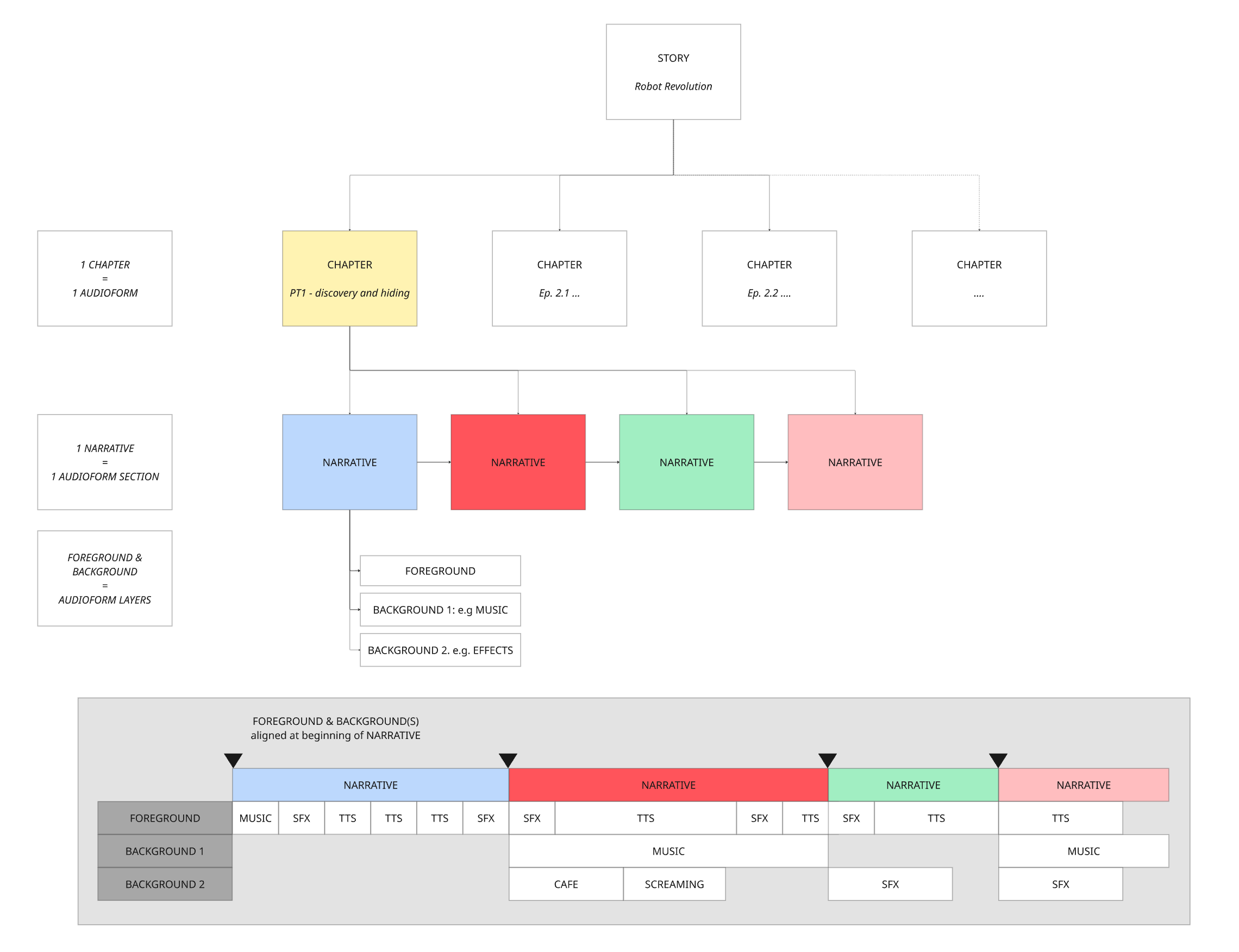
In addition, the story contains the assets and settings you want to use in your audio creation including:
voices- A list of audiostack voices mapping to your characters. This will be extended to allow use of recommended voices that match your criteria (e.g. english speaking female with american accent).soundssoundDesigns- A list of sound designs (music) for use in your story. These can be from our sound library or uploaded files. This will be extended to allow use of recommended music that match your criteria (e.g. epic music with synths).soundEffects- A list of sound effects for use in your story. These can be from our sound effects library or uploaded files. This will be extended to allow use of recommended effects that match your criteria.
masteringsettings - optional settings to allow finer grained control of your mix and masteringdeliverysettings - optional settings to allow control of output file formats
How to use the Story endpoint
- Define your story: Following AudioStack's story format, you need to map your content into a story JSON. You can select the perfect voices, music and sound effects and then make them all align perfectly with your text to create amazing, expressive audio.
- Post the story to the endpoint: AudioStack's story endpoint validates your input and returns a storyId.
- Poll for the status of your story with your storyId: The story engine takes care of rendering your story via audioform at scale. All you need to do is track the status of your story via the storyId.
Recipes to get started
Checkout these recipes to start creating audio stories with the story endpoint. Each recipe builds on the previous to add more layers and richness to your story.
- Building a single voice story
- Adding music from the AudioStack Sound library
- Adding your own music and sound effects
- Creating a multi-voice story
- Getting AI-recommended sound effects
API Docs
Check out these pages in our API docs
Updated 8 months ago